by Mike Constanza
You're scrolling through Amazon at midnight, staring at a cracked Switch back plate and wondering whether a replacement shell is worth the hassle. Maybe your Joy-Con took a fall and the housing is scuffed beyond saving. Or maybe you simply want to inject some personality into a console that came in the same gray shell as everyone else's. Either way, picking the wrong replacement means misaligned button cutouts, rattling seams, or worse — damaged ribbon cables you didn't plan on replacing.
In 2026, the Nintendo Switch family covers four distinct hardware generations: the original Switch, the Switch Lite, the Switch OLED, and the Nintendo Switch 2. Each model requires its own shell — there is no cross-compatibility. The aftermarket has matured significantly over the past few years, with eXtremeRate leading the field in precision-fit housings while brands like Onyehn offer more affordable OEM-style options. This guide covers replacements across all four models, with honest assessments of fit, finish, and installation difficulty for each one. For a quick refresher on the hardware differences between Switch generations, the Nintendo Switch Wikipedia page covers the platform's evolution clearly. If you enjoy customizing your gaming setup beyond the console itself, our picks for the best keyboards for OSU and the best arcade buttons in 2026 are worth a look as well.
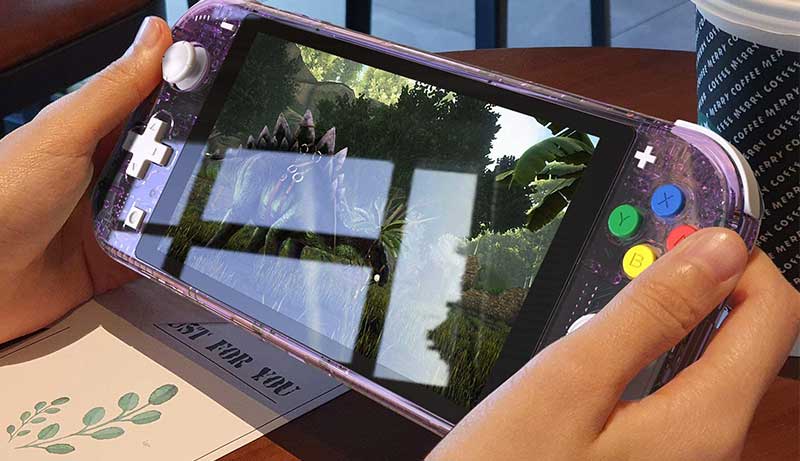
Before you commit to any shell on this list, understand one thing up front: replacement shell installation is not beginner territory. Most full-set kits require you to remove the motherboard, disconnect ribbon cables, and reassemble everything from scratch. The brands covered here all point to YouTube installation guides — watch them at half-speed before touching a screwdriver. That said, if you're comfortable with careful hands-on work, the payoff is a console that looks exactly the way you want it and functions identically to stock.
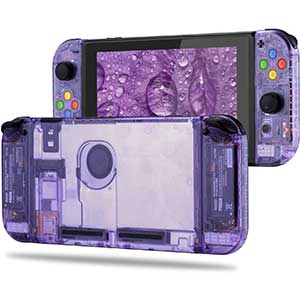



If you want to completely transform the look of your original Nintendo Switch, this eXtremeRate kit is the most comprehensive option on the market. The Clear Atomic Purple colorway gives the console a semi-transparent finish that shows off the internal components — it's the kind of look that turns heads at LAN events and gaming setups alike. The kit includes the full console back plate, Joy-Con housings, and a complete set of replacement buttons, so you're not left sourcing additional parts mid-installation.
Fit quality is where eXtremeRate has always excelled, and this shell lives up to that reputation. Every port cutout — USB-C, headphone jack, game card slot, SD card slot — aligns precisely with the original tolerances. The plastic material is rigid PC with a smooth finish that doesn't show fingerprints as aggressively as the stock glossy shell. Button travel and click feel remain consistent with OEM after installation, which matters if you're gaming for extended sessions.
Installation is rated moderate difficulty. You'll need a tri-wing screwdriver and a Phillips #00, and eXtremeRate's official YouTube guide (search "ExtremeRate New Horizon Style for Switch" or use the ID o8QPB2uTbHk) is thorough. Watch at half speed, pause at each step, and proceed methodically. Rushing the ribbon cable connectors is the most common way to create problems. If you've modded electronics before, budget 90 minutes and you'll be fine.
Pros:
Cons:
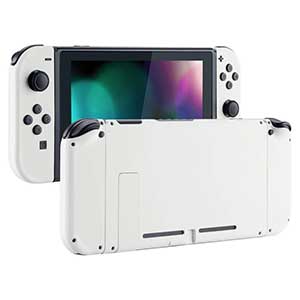
Not everyone wants a translucent shell or a bold color. Sometimes your console's back plate cracked in a fall and you simply need an identical replacement — same gray, same texture, same look as stock. The Onyehn back cover is designed specifically for that scenario. It replicates the original Nintendo Switch back housing with the same matte gray finish and the same structural form factor, making it the least intrusive repair option on this list.
This is a back plate only — it doesn't include the kickstand, screws, or any additional hardware. If your original kickstand is intact and your screws are reusable, that's perfectly fine. The fit matches OEM dimensions closely enough that all internal mounting points line up without modification. The plastic quality isn't quite as premium as eXtremeRate's PC material, but for a stock replacement it holds up well under normal handling.
The biggest consideration here is installation guidance: Onyehn doesn't include instructions, and professional installation is recommended if you're not experienced with Switch disassembly. That said, the back plate swap is simpler than a full-set replacement — you're primarily removing the back screws, disconnecting fewer components, and swapping only the outer housing. For someone who just needs their console looking stock again after a crack or scratch, this is the most cost-effective solution available in 2026.
Pros:
Cons:
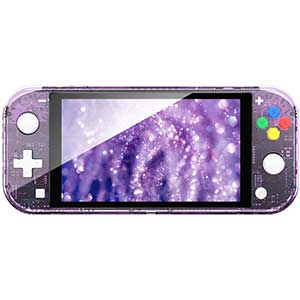
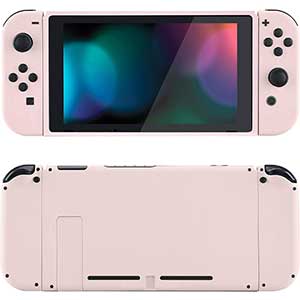
The Cherry Blossoms Pink shell from eXtremeRate sits in the same product line as the Clear Atomic Purple, sharing identical construction quality and fit precision — the difference is purely aesthetic. This colorway features a soft, warm pink with cherry blossom design accents that gives the Switch a distinctive look while remaining tasteful rather than garish. It's one of eXtremeRate's most popular finishes and has been a catalog staple for good reason.
Like the Clear Atomic Purple version, this is a full-set kit covering the console back plate, both Joy-Con housings, and a complete replacement button set. The PC plastic is rigid and holds its color well over time — you won't see the pink fading after six months of regular use. Button function after installation is identical to stock, with no mushiness or travel change introduced by the new housing. Port cutouts remain precisely aligned across the USB-C, headphone, game card, and microSD positions.
Installation difficulty is the same as any eXtremeRate full-set kit: moderate, requiring a tri-wing screwdriver, patience, and the official YouTube guide. Search "ExtremeRate New Horizon Style for Switch" or use video ID o8QPB2uTbHk as your reference. Half-speed playback and a pause-proceed-repeat approach is how you get this right. Budget an afternoon for your first attempt and don't rush the ribbon cable reconnections. The end result is a Switch that looks like it came from the factory this way.
Pros:
Cons:
The Switch OLED has a larger screen, a redesigned kickstand, and a slightly different internal layout compared to the original Switch — meaning it needs its own specifically designed replacement shells. This eXtremeRate clear black full set is one of the few aftermarket options built from the ground up for the OLED model, and it delivers the kind of precision that makes the difference between a clean mod and a frustrating one. The translucent black finish reveals the internal components while giving the console a sleek, understated look that pairs well with any setup.
Beyond the aesthetic upgrade, eXtremeRate improved the kickstand design in this kit. It's 1mm thicker than the OEM kickstand and features a redesigned hinge that holds angles more firmly across a wider range of positions — a genuine functional improvement over the original, which was already better than the original Switch's kickstand. The console back plate, Joy-Con 2 housings, and all buttons are included in the set, giving you everything needed for a complete exterior transformation.
This kit carries a high installation difficulty rating — a step up from the original Switch kits. The OLED model has additional internal complexity, and the Joy-Con housings require careful disassembly of the magnetic rail mechanism. eXtremeRate's YouTube guide (search "eXtremeRate Full Set Shell for Nintendo Switch OLED" or use ID GiD5k92n4pc) covers the process in detail. Half-speed viewing is not optional here — it's necessary. If you've successfully done a full-set install on the original Switch before, this is manageable. If this is your first shell swap, consider practicing on a cheaper device first.
Pros:
Cons:
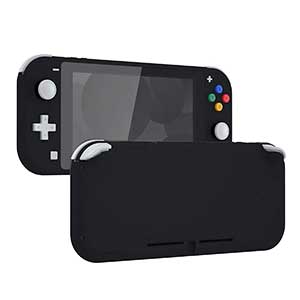
The Switch Lite is a fundamentally different device from the original Switch — it's a dedicated handheld with no removable Joy-Con and a more compact form factor. Its replacement shell market is smaller but no less important, especially since the Lite's integrated design means a cracked housing can't be partially replaced. This eXtremeRate white shell covers the complete Switch Lite exterior, including the grip areas, all button openings, and the analog stick surrounds, giving you a full clean-slate refresh.
The kit also includes a white border screen protector that integrates flush with the new shell, creating a seamless front face that looks intentional rather than afterthought. The white color is a clean, bright finish that resists smudging better than you'd expect for a light-colored shell. After installation, the tactile feel of the buttons and the resistance of the analog sticks remain unchanged — the shell doesn't interfere with any of the Lite's integrated inputs.
Installation is rated high difficulty — the Lite's integrated design means more components are interconnected compared to a standard Switch Joy-Con swap. The eXtremeRate YouTube guide (search "eXtremeRate replacement shell installation for Nintendo Switch Lite") walks through the complete disassembly sequence. Budget two to three hours for this project if you're doing it for the first time, and make sure you have the proper tri-wing and Phillips screwdrivers before you start. The included screen protector is a genuine value add that saves you an additional purchase and installation step.
Pros:
Cons:
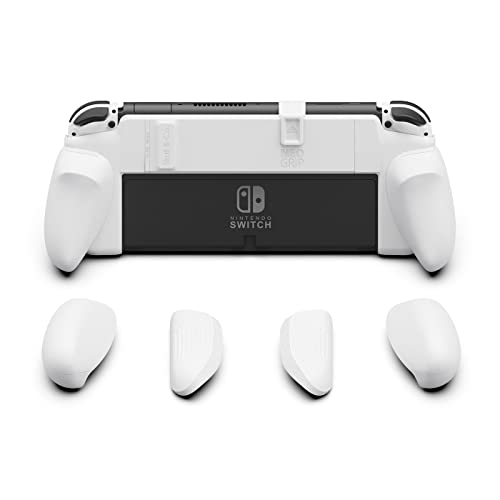
Not every situation calls for full disassembly. If your console's internals are fine but handheld gaming causes hand fatigue over long sessions, the Skull & Co. NeoGrip is the answer. This hard PC shell attaches over your existing console housing without requiring any screwdriver work — it snaps on and off cleanly while adding substantial grip extensions on both sides that make the Switch feel more like a traditional controller in your hands.
The NeoGrip is compatible with both the original Nintendo Switch and the Switch OLED model, covering both without requiring you to purchase separate versions. More importantly, the design doesn't block anything that matters: the kickstand remains accessible, the card slot stays open, all vents are unobstructed, and every button and port remains fully functional. The grip extensions come in multiple sizes, so you can swap them to find the fit that works best for your hand size — a feature that genuinely sets this apart from fixed-grip competitors.
The hard PC construction provides legitimate drop protection while adding grip. It reduces fall impact better than a soft silicone skin, and the rigid structure doesn't creep or deform over time. For players who spend long sessions in handheld mode, the ergonomic improvement is substantial and immediate. This is also the most accessible option on this list if you're not comfortable with electronics disassembly — there's no risk to your hardware, and you can remove it at any time without leaving a mark. It's a lower-commitment upgrade with a high return in day-to-day comfort, similar in approach to how the best M.2 SSDs for gaming improve your setup without requiring you to rebuild anything from scratch.
Pros:
Cons:
The Nintendo Switch 2 launched with its own hardware platform, and eXtremeRate moved quickly to develop replacement shells specifically for it. This Deluxe Version clear atomic purple kit is precision-engineered for the Switch 2's updated console body and the new Joycon 2 design — including full compatibility with the magnetic release and lock mechanism that the Switch 2 uses instead of the original's sliding rail system. This is not a modified Switch 1 shell fitted to the Switch 2 — it is built from scratch for the new hardware.
The durable PC plastic construction is consistent with eXtremeRate's established standard: rigid, scratch-resistant, and vibrant. The clear atomic purple translucent finish lets you see the internal components of the Switch 2 through the housing, which is a particularly compelling look given the updated internals. Every cutout is precision-machined to match the Switch 2's physical layout, including the updated button positions and the revised USB-C port placement. Dock mode remains fully functional after installation — the shell doesn't interfere with the docking contact points.
This kit earns its Deluxe Version designation through completeness: you get the full rear console plate, the complete Joycon 2 housings, and every replacement button in the set. Installation difficulty is high — the Switch 2's Joycon 2 magnetic attachment system introduces new complexity compared to previous generations. eXtremeRate provides a dedicated YouTube guide specifically for this kit, so you're not working blind. If you're investing in the Switch 2 for the long haul, a shell swap this early in the console's life means you're protecting and personalizing hardware that will be in service for years to come. The translucent purple finish alone makes this the most visually distinctive Switch 2 modification available in 2026.
Pros:
Cons:
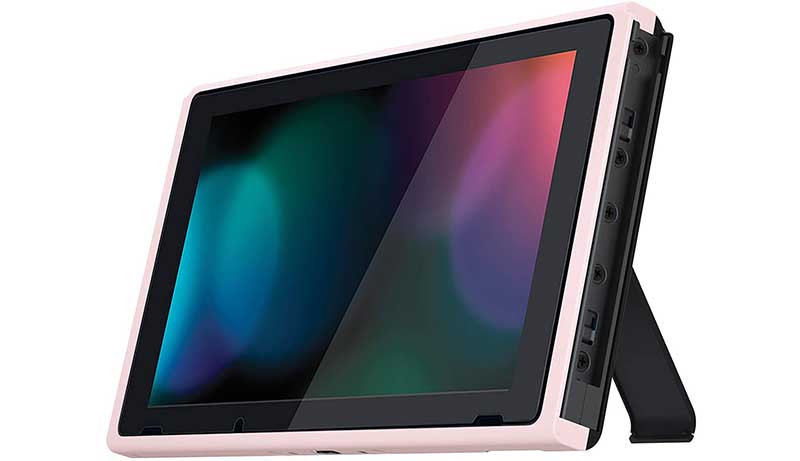
The single most important thing to verify before you buy is whether the shell you're looking at is made for your specific Nintendo Switch model. The original Switch, the Switch Lite, the Switch OLED, and the Nintendo Switch 2 are four distinct hardware platforms with different physical dimensions, different internal layouts, and different port positions. A shell made for the original Switch will not fit the OLED, and none of the pre-Switch 2 shells work on the new hardware. Every product listing should clearly state its compatibility — if it doesn't, walk away. The Switch 2's Joycon 2 uses a magnetic attachment system instead of a sliding rail, which introduces additional complexity that older shells and kits simply weren't designed to handle.
Decide early whether you need a complete exterior overhaul or just a specific component replaced. Full-set kits — like eXtremeRate's lineup — include the console back plate, both Joy-Con housings, and a complete set of replacement buttons. They give you the most comprehensive transformation but also require the most extensive disassembly. Back plate-only options like the Onyehn cover are faster to install and better suited for situations where only the rear housing is damaged. If your Joy-Con are in good shape, a full-set kit might mean unnecessary work — and unnecessary risk to components you don't need to touch. Assess your actual damage before deciding on scope.
The material determines how the shell feels in your hands, how well it holds up to regular use, and how much it shows wear over time. PC (polycarbonate) plastic is the standard for premium aftermarket shells — it's rigid, scratch-resistant, and holds color without fading. ABS plastic is softer and more prone to surface scratches. For translucent finishes like the clear atomic purple options, PC material is especially important because the transparency is part of the aesthetic and cloudiness from cheap material ruins the effect. Matte finishes tend to resist fingerprints better than glossy ones, which matters if you're not planning to clean your console constantly. Soft-touch coatings feel premium initially but can become tacky over time with sweat and humidity.
Every shell on this list includes an installation difficulty rating for a reason. The original Switch full-set kits are rated moderate — meaning you need basic electronics experience and the right tools but can realistically succeed on your first attempt with proper preparation. The Switch OLED and Switch Lite kits are rated high — additional internal complexity means the margin for error is smaller. The Switch 2 kit is the most advanced, given the new Joycon 2 magnetic system. If you've never modded electronics before, the Skull & Co. NeoGrip is your answer — it attaches without any disassembly and removes the risk entirely. For everyone else, the key tools are a tri-wing screwdriver, a Phillips #00, and a plastic spudger. Watch the official eXtremeRate YouTube guides at half speed. Pause at each step. Rushing is how damage happens.
This category of tech electronics accessories rewards preparation. The more time you put into selecting the right shell for your model and skill level, the more satisfied you'll be with the outcome. Don't rush the purchase decision any more than you should rush the installation itself.
Yes. Opening the console and replacing the shell constitutes modification of the hardware, which voids the manufacturer warranty. Nintendo's limited warranty does not cover damage resulting from unauthorized modifications. If your Switch is still under warranty and you're considering a shell swap for cosmetic reasons rather than repair, you should factor this into your decision. For consoles that are already out of warranty, this is a non-issue — you're working on hardware you own outright.
Most replacement shell installations require a tri-wing Y00 screwdriver (for the Joy-Con and console screws) and a Phillips #00 screwdriver (for internal components). A plastic spudger or pry tool is useful for safely disconnecting ribbon cables without damaging the connectors. Some kits include the screwdrivers in the package — check the product listing before purchasing tools separately. Anti-static tweezers are helpful but not strictly required. Avoid metal pry tools near the PCB.
The Skull & Co. NeoGrip is the only option on this list that requires no electronics experience — it attaches externally without any disassembly. Full-set shell replacements require at minimum a basic comfort level with small screws, ribbon cable connectors, and careful component handling. If you've assembled a PC, replaced a smartphone screen, or done any similar electronics work, you can handle a moderate-difficulty Switch shell swap. True beginners should start with a back-plate-only replacement before attempting a full-set kit.
Yes — for original Switch shells, compatibility with official accessories and the Nintendo dock is maintained after installation. The shells are precision-cut to OEM tolerances, so the dock connector, Joy-Con rail, and kickstand function normally. For the Switch OLED full-set kit, dock compatibility is also preserved. Always verify with the specific product listing for any accessory compatibility notes, especially for third-party docks that may have tighter physical tolerances than the official Nintendo dock.
For an original Switch back-plate-only swap, budget 30 to 45 minutes if you've done it before and have your tools organized. A full-set replacement on the original Switch takes 60 to 90 minutes for a first attempt when you're following the installation guide carefully. Switch OLED and Switch Lite full-set kits take 90 to 180 minutes for first-timers due to increased internal complexity. The Nintendo Switch 2 full-set is in the same range as the OLED. Do not attempt any of these as a rushed project — set aside uninterrupted time and a clean workspace.
When installed correctly, quality replacement shells like those from eXtremeRate do not alter button travel, click resistance, or analog stick performance. The shells are manufactured to match OEM tolerances, so the button housings seat the existing switches at the same depth and angle as the original. Poor-quality shells with incorrect tolerances can cause mushy buttons or sticky analog sticks — this is one of the primary reasons to choose an established brand with documented OEM-spec fit over cheaper no-name alternatives.
The right replacement shell is the one built for your exact Switch model, installed with patience — get both right and your console will look better than the day you bought it.


About Mike Constanza
For years, Mike had always told everyone "no other sport like baseball." True to his word, he keeps diligently collecting baseball-related stuff: cards, hats, jerseys, photos, signatures, hangers, shorts (you name it); especially anything related to the legendary player Jim Bouton.Mike honorably received Bachelor of Science degree in Business Administration from University of Phoenix. In his graduation speech, he went on and on about baseball... until his best friend, James, signaled him to shut it.He then worked for a domain registrar in Phoenix, AZ; speciallizng in auction services. One day at work, he saw the site JimBouton.com pop on the for-sale list. Mike held his breath until decided to blow all of his savings for it.Here we are; the site is where Mike expresses passion to the world. And certainly, he would try diversing it to various areas rather than just baseball.
You can get FREE Gifts. Or latest Free phones here.
Disable Ad block to reveal all the info. Once done, hit a button below
 im
im