Nearly 40 percent of portable Bluetooth speakers develop a charging fault within two years of purchase — and the vast majority of those failures are fixable without a repair shop or a replacement purchase. If your speaker has gone quiet on you, learning how to fix Bluetooth speaker charging problems is the fastest way to bring it back to life. Whether you take yours on camping trips, use it in your home gym, or have it running as part of a budget home theater setup, a dead battery doesn't have to mean a dead speaker. Find more guides like this in our tech and electronics section.

Charging problems show up in a few distinct patterns. Sometimes the speaker won't turn on at all. Sometimes it charges for a few seconds and stops. Sometimes the indicator light blinks but the battery never fills up. Each symptom points to a different root cause, and knowing which one you're dealing with cuts your troubleshooting time in half.
The good news is that most charging failures fall into three categories: bad cables, dirty or damaged ports, and aging batteries. Work through them in order and you'll find the fix faster than you expect.
Contents
Most Bluetooth speakers run on lithium-ion or lithium-polymer batteries — the same chemistry inside your smartphone. According to Wikipedia's overview of lithium-ion batteries, these cells support roughly 300 to 500 full charge cycles before capacity noticeably degrades. When your speaker approaches that limit, charging becomes erratic. The internal charge management circuit controls the flow of current into the battery, and if either the battery or that circuit fails, the speaker simply stops accepting a charge.
Every complete discharge-to-full-charge counts as one cycle. Partial charges count proportionally, so draining to 50 percent and recharging to full counts as half a cycle. Keeping your speaker between 20 and 80 percent charge is one of the simplest habits you can build to push battery life well beyond the manufacturer's estimate. Most users don't realize this until performance has already declined. If your speaker used to run for 12 hours and now struggles past 3, cycle degradation is almost certainly the cause.
The battery gets blamed for everything, but the charging cable or USB port is responsible for roughly half of all charging failures. Before you open your speaker or order a replacement battery, swap the cable. Use a different USB-C or Micro-USB cable from a known working device and plug it into a wall adapter. If the speaker starts charging immediately, you just solved the problem in under a minute.
Port damage is another overlooked culprit. If you've plugged and unplugged your speaker hundreds of times, the connector pins inside the charging port can bend or corrode. A damaged port looks perfectly functional but delivers no current. Hold the cable at a few different angles while it's plugged in — if charging starts or stops depending on the angle, the port is the problem, not the battery.
The belief that leaving your speaker plugged in overnight destroys the battery is largely outdated. Modern speakers include a charge management chip that cuts power automatically once the battery hits 100 percent. Chronic overnight charging at high temperatures does accelerate long-term wear, but a single overnight session won't brick your speaker. Stop worrying about this myth and focus on the actual culprits instead.
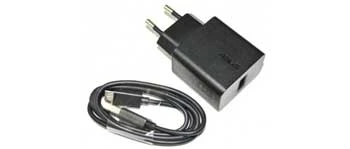
Every troubleshooting session should start here. Grab a cable you know works, plug it into a wall adapter rated for at least 5V/1A, and connect it to your speaker. Avoid USB ports on laptops, keyboards, or USB hubs — they often deliver insufficient current, which isn't enough to trigger charging on many speakers. Always charge from a wall outlet when you're diagnosing a problem. Cheap or counterfeit adapters are another common failure point — borrow a high-quality adapter from another device if your current one is suspect.
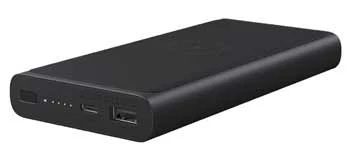
If the wall outlet doesn't help, try a power bank. Power banks output a consistent 5V charge and can bypass quirks in wall adapters that aren't immediately obvious.
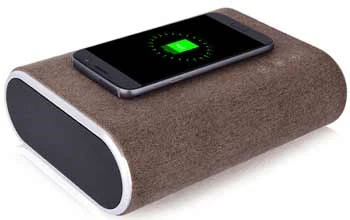
Some newer Android phones support reverse wireless charging, which lets you lay the phone face-down and rest a compatible speaker on top of it to transfer charge. It's slow, but it confirms whether the speaker's battery can accept any power at all — useful diagnostic information when nothing else is working.
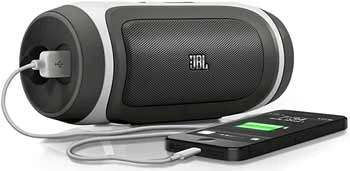
A hard reset clears the firmware state and can resolve software-level charging blocks that prevent the battery circuit from initializing. The exact process varies by brand, but it typically involves holding the power button for 10 to 15 seconds until the speaker powers off and restarts. Check your model's manual or the manufacturer's support page for the specific sequence. After the reset, plug in the charger immediately and watch the indicator light — it should respond within 30 seconds if the reset cleared the issue.
Dust, lint, and pocket debris pack into the charging port over time and physically prevent the cable from seating properly. Use a wooden toothpick — not metal — to gently scrape debris out of the port, then follow with a short burst of compressed air. Never use water or liquid alcohol directly inside the port. This fix takes under two minutes and solves the problem more often than most people expect. It's the kind of small thing that gets overlooked because it seems too simple to actually work — but it does.
Port maintenance applies to other audio devices too. If you're troubleshooting related connectivity issues, our guide on using a single-jack headset on PC without a splitter covers port behavior and signal flow in useful detail.
Some charging problems stem from firmware bugs rather than any hardware failure. Manufacturers push updates through companion apps — JBL Connect, Bose Connect, Sony Headphones Connect, and others. Connect your speaker via Bluetooth, open the app, and check for pending updates. Installing the latest firmware takes about five minutes and occasionally resolves charging behavior that looked exactly like a hardware fault. It costs nothing and takes almost no effort, so do it before going any further.
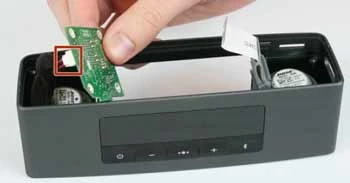
If basic troubleshooting hasn't solved the problem, the next step is opening the speaker to inspect the battery and charging board. Most speakers use Phillips or Torx screws, sometimes hidden under rubber feet or warranty stickers. Once you're inside, check that the battery connector is fully seated on the board. A loose connector is a surprisingly common manufacturing defect that surfaces after the speaker takes a drop.
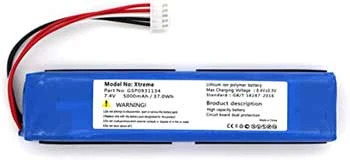

Replacing the battery is a legitimate DIY option on many popular speaker models. Search your model number alongside "battery replacement" to find teardown videos and compatible replacement cells. The process is similar in spirit to other device-level repairs — if you've worked through a guide like connecting a Bluetooth headset to PS3, which requires navigating device settings and pairing sequences with patience, you already have the right mindset for this kind of fix.
| Symptom | Most Likely Cause | Recommended Fix | Difficulty |
|---|---|---|---|
| Won't charge at all | Faulty cable or adapter | Swap cable, charge from wall outlet | Easy |
| Charges then stops immediately | Loose port or dirty pins | Clean port, reseat cable firmly | Easy |
| Charges briefly, drains very fast | Degraded battery cell | Replace battery | Moderate |
| No indicator light response | Firmware bug or hard fault | Hard reset, then firmware update | Easy–Moderate |
| Charges only at specific cable angles | Bent or corroded port pins | Clean port; resolder if needed | Moderate–Advanced |
| Physical port visibly broken | Cracked solder joint | Resolder or replace charging port | Advanced |
If the charging port's solder joints have cracked — a common result of repeated cable stress — resoldering requires a fine-tip soldering iron and a steady hand. This isn't impossible for a determined beginner, but it's the point where most people correctly decide to pay for the repair. An electronics shop will typically charge between $20 and $60 for a port resolder, which is almost always cheaper than replacing a quality speaker. Get a quote before you buy a new one.
Here's a quick summary of what falls into each category:
Rapid battery drain after charging usually signals a degraded battery that has exceeded its useful charge cycles. The battery may accept a charge but can no longer hold it at full capacity. Replacing the battery cell is the most effective fix, and for most popular speaker models, replacement cells are available online at low cost.
You can use any cable with the correct connector type — USB-C or Micro-USB — but cable quality matters. Cheap or damaged cables may not deliver consistent current, causing the speaker to charge slowly or not at all. Always use a cable rated for data and charging, not a charge-only cable, for the most reliable results.
Yes, on any modern speaker with a built-in charge management chip. The chip cuts power automatically when the battery reaches 100 percent. Repeated overnight charging in hot environments does accelerate long-term wear, but a single overnight session poses no meaningful risk to the battery.
If swapping cables and cleaning the port doesn't solve the problem, and the speaker charges very slowly or drains within an hour of a full charge, the battery is almost certainly the issue. A speaker that takes dramatically longer to charge than it used to is also showing battery degradation rather than a cable or port problem.
A blinking indicator that never leads to a full charge often signals a firmware issue, a faulty charge management circuit, or a battery that can no longer hold a charge reliably. Start with a hard reset and firmware update. If the problem persists after both, the battery or charge board likely needs replacing.
Absolutely. Even speakers rated as water-resistant can suffer internal corrosion if moisture reaches the charge port or circuit board. If your speaker was exposed to water and stopped charging afterward, let it dry completely in a warm, dry location for at least 48 hours before attempting to charge it again. Forcing a charge on a wet circuit board can permanently damage the charge management chip.
Most lithium-ion batteries in Bluetooth speakers maintain strong capacity for 300 to 500 full charge cycles. Depending on how often you charge, that translates to roughly two to four years of regular daily use. After that point, you'll notice shorter runtime per charge and, eventually, charging irregularities like the ones described in this guide.
If the speaker originally cost more than $50 and the fix is a cable swap, port cleaning, or battery replacement, repair is almost always worth it. If the charge management IC has failed or the circuit board has water damage, repair costs can approach or exceed the speaker's value. In that case, replacement makes more sense — especially if the model is discontinued and parts are scarce.
Before you spend money on a replacement, spend twenty minutes with a toothpick, a different cable, and a wall outlet — the fix is almost always that simple.


About Mike Constanza
For years, Mike had always told everyone "no other sport like baseball." True to his word, he keeps diligently collecting baseball-related stuff: cards, hats, jerseys, photos, signatures, hangers, shorts (you name it); especially anything related to the legendary player Jim Bouton.Mike honorably received Bachelor of Science degree in Business Administration from University of Phoenix. In his graduation speech, he went on and on about baseball... until his best friend, James, signaled him to shut it.He then worked for a domain registrar in Phoenix, AZ; speciallizng in auction services. One day at work, he saw the site JimBouton.com pop on the for-sale list. Mike held his breath until decided to blow all of his savings for it.Here we are; the site is where Mike expresses passion to the world. And certainly, he would try diversing it to various areas rather than just baseball.
You can get FREE Gifts. Or latest Free phones here.
Disable Ad block to reveal all the info. Once done, hit a button below
 im
im