Pushing a CPU or GPU past its factory clock speed can deliver 10 to 25 percent more performance without spending a dollar on new hardware — a well-documented gain backed by thousands of real-world tests. If you want to know how to overclock CPU and GPU components in your own PC, this guide walks you through every step. You'll get clear instructions, safety best practices, and real performance benchmarks. For more guides like this, browse our tech and electronics section.
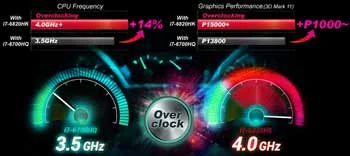
Overclocking means running your processor or graphics card at speeds higher than the manufacturer's stock settings. According to Wikipedia's overview of overclocking, the practice has existed since the earliest days of personal computing. Modern hardware makes it more accessible than ever. CPU and GPU makers set conservative defaults to ensure broad compatibility — that leftover headroom is yours to claim. If you ever want to dial things back, our guide on how to underclock your GPU covers the reverse process.
Before you dive in, confirm two things. Your CPU needs an unlocked multiplier — Intel K-series chips and most AMD Ryzen processors qualify. Your GPU almost always supports overclocking out of the box. And your cooling setup needs to handle the extra heat. A mid-range air cooler or AIO liquid cooler is the minimum you should work with before pushing clock speeds.
Contents

A few simple adjustments can deliver immediate gains before you touch a single clock multiplier. Think of these as zero-risk quick wins that take minutes to apply.
Most DDR4 and DDR5 RAM ships running below its rated speed by default. Enabling XMP (Intel platforms) or EXPO (AMD platforms) pushes your memory to its advertised speed instantly. This alone can improve gaming performance by 5 to 10 percent on AMD systems.
Outdated GPU drivers limit performance. Install the latest stable release from your GPU manufacturer before overclocking. Also check for a BIOS firmware update for your motherboard — manufacturers frequently ship performance improvements in updates.
On Windows, set your power plan to High Performance or Ultimate Performance. A balanced power plan throttles your CPU and doesn't ramp up quickly enough under gaming or rendering loads. This change takes 30 seconds and costs nothing.
CPU overclocking happens in your BIOS. Your goal is to raise the clock multiplier in small increments while keeping temperatures and voltages within safe ranges.

GPU overclocking is more beginner-friendly than CPU overclocking. The standard tool is MSI Afterburner — free, reliable, and compatible with virtually all modern GPUs.
Understanding how to overclock CPU and GPU components safely separates successful tuners from people who corrupt saves and crash systems. Follow these practices consistently.
An overclocked CPU running hot will throttle itself back, defeating the entire purpose. Make sure your cooler makes solid contact with the CPU heat spreader. Reapply thermal paste if your current application is more than a year or two old — a fresh application alone can drop temps by 5 to 10°C.
These techniques go beyond the basics. They're what experienced overclockers use to push further without sacrificing stability.
AMD Ryzen CPUs support Curve Optimizer in the BIOS, which lets you tune each CPU core individually. Strong cores run at higher clocks while weaker cores receive a negative offset to stay stable. This approach outperforms a flat all-core overclock in most workloads.
Intel's hybrid-architecture CPUs separate Performance cores from Efficiency cores. Use the Intel Extreme Tuning Utility (XTU) to overclock P-cores specifically. Single-threaded P-core performance is what drives gaming frame rates — that's where your effort pays off most.
There's no point pushing 30 extra frames per second if your display can't show them. If you're overclocking for gaming, check out our guide on how to choose a gaming monitor for PC or console to make sure your display can keep up with your newly tuned hardware.
Keep a simple text file with your settings, results, and temperatures at each step. When instability appears — and it will — your log makes it easy to retrace exactly what changed.
Overclocking is forgiving when approached carefully. But these errors can cause real problems — some of them permanent.
This is the most dangerous mistake. Excess voltage accelerates electromigration — gradual degradation of the CPU's internal circuitry. Most consumer CPUs should not exceed 1.4V Vcore for daily use. Always check your specific CPU's recommended safe voltage range before touching voltage settings.
An overclock that hasn't crashed yet isn't necessarily stable. It will fail when you can least afford it — during a render job, a gaming session, or an important deadline. Always run a full stress test before declaring your OC stable.
Average temperatures look fine. Spike temperatures are what kill hardware over time. Use HWiNFO64 to log maximum readings during your stress test. A single spike to 105°C means your cooling isn't adequate for that clock speed.
Flickering textures, pixel corruption, or strange colors during GPU testing mean your clock is too high — back off immediately. If you start seeing visual glitches like a pink or discolored screen, your GPU overclock is a likely culprit worth ruling out first.
Major GPU driver updates can interact with existing OC profiles. After any significant driver update, re-run a 20-minute stability test to confirm your overclock still holds.
Here's what typical overclocking delivers across common hardware configurations. Your results will vary based on your specific chip's silicon quality, your cooling headroom, and how much voltage you're willing to run.
| Metric | CPU Overclocking | GPU Overclocking |
|---|---|---|
| Typical clock gain | 200–600 MHz all-core | 100–250 MHz core clock |
| Gaming FPS improvement | 5–15% (CPU-limited titles) | 5–15% (GPU-limited titles) |
| Rendering / encoding gain | 10–20% | Minimal |
| Primary tool | BIOS, Intel XTU, or Ryzen Master | MSI Afterburner |
| Time to first stable OC | 1–3 hours | 30–60 minutes |
| Skill level required | Intermediate | Beginner-friendly |
| Impact on power draw | Moderate to high | Moderate |
GPU overclocking is the better starting point for most users. It's safer, faster to set up, and immediately visible in gaming benchmarks. CPU overclocking delivers bigger gains for CPU-bound workloads like video editing, 3D rendering, and simulation work.

Getting a stable overclock isn't the finish line. Maintaining it over time requires occasional attention — especially as your system ages.
When you add RAM, update your BIOS, or swap your cooler, re-run your stability tests. Any of these changes can shift how your overclock behaves. A 20-minute stress test after significant hardware changes is all it takes to confirm everything is still solid.
Save your stable OC profile in your BIOS before experimenting further. If a new overclock attempt destabilizes your system, you can restore your working settings instantly. Also keep a copy of your settings in a plain text file — BIOS profiles can sometimes be lost after a firmware update.
For complete guidance on keeping your hardware in top shape, see our step-by-step guide on how to clean a motherboard safely. A clean system holds an overclock far better than a dust-choked one. And if you want to make full use of that extra GPU headroom, our guide on setting up a home theater system on a budget is a great next step.
Overclocking is safe when done carefully. Use incremental steps, stay within recommended voltage limits, and always stress test your results. Most modern hardware includes thermal protection that shuts down the system before permanent damage occurs. The real risk is crashes and data loss from an unstable OC, not immediate hardware failure.
In most cases, yes. Intel and AMD typically void the CPU warranty if overclocking causes damage. GPU warranties vary by manufacturer — some AIB partners offer overclocking-friendly terms. Check your specific warranty documentation before you start. Many enthusiasts accept this tradeoff given the performance gains available.
A typical CPU overclock delivers 5 to 15 percent better performance in CPU-limited workloads. A GPU overclock adds 5 to 15 percent more frames in GPU-limited games. Your actual gains depend on your specific chip's silicon quality, your cooling headroom, and how far you're willing to push voltage.
No. A quality air cooler — such as a large tower cooler with dual fans — handles moderate overclocks on most consumer CPUs. Liquid cooling gives you more thermal headroom for aggressive overclocks and higher voltage settings, but it's not required for entry-level tuning. GPU cooling is rarely a bottleneck since most AIB cards ship with capable heatsinks.
MSI Afterburner is the standard tool for GPU overclocking and works with virtually all modern NVIDIA and AMD cards. Pair it with RivaTuner Statistics Server for on-screen monitoring during testing. For benchmarking your results, 3DMark and Unigine Heaven are both reliable and free to use at a basic level.
Yes, but only through sustained abuse — primarily running excessive voltage over long periods. A conservative overclock with modest voltage increases and adequate cooling causes negligible long-term degradation. The bigger day-to-day risk is system instability: crashes, corrupted files, and unexpected shutdowns. These are recoverable. Follow the voltage guidelines and you're unlikely to cause lasting damage.
The best overclock isn't the highest number you can achieve — it's the one that runs stable, stays cool, and never crosses your mind again.


About Mike Constanza
For years, Mike had always told everyone "no other sport like baseball." True to his word, he keeps diligently collecting baseball-related stuff: cards, hats, jerseys, photos, signatures, hangers, shorts (you name it); especially anything related to the legendary player Jim Bouton.Mike honorably received Bachelor of Science degree in Business Administration from University of Phoenix. In his graduation speech, he went on and on about baseball... until his best friend, James, signaled him to shut it.He then worked for a domain registrar in Phoenix, AZ; speciallizng in auction services. One day at work, he saw the site JimBouton.com pop on the for-sale list. Mike held his breath until decided to blow all of his savings for it.Here we are; the site is where Mike expresses passion to the world. And certainly, he would try diversing it to various areas rather than just baseball.
You can get FREE Gifts. Or latest Free phones here.
Disable Ad block to reveal all the info. Once done, hit a button below
 im
im