Imagine standing at an electronics counter with two audio cables that look completely different, uncertain which one your new receiver actually needed. That moment of confusion is more common than manufacturers like to admit, and it rarely comes with a helpful label on the packaging. Understanding the SPDIF vs Toslink difference matters whether you are building a home theater or simply improving your audio setup, and it is one of the more practical choices you will encounter in the tech and electronics space.
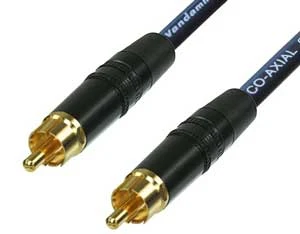
Both SPDIF and Toslink are digital audio connection standards designed to carry audio signals between components with far less degradation than analog alternatives deliver. They share the same underlying Sony/Philips Digital Interface Format protocol, yet they differ in physical form, transmission method, and the situations where each one performs most reliably. Getting familiar with those distinctions helps you make a confident decision rather than guessing at the cable counter.
It helps to know that S/PDIF describes a digital audio protocol rather than a single cable type, jointly developed by Sony and Philips as a consumer audio standard. Toslink, which stands for Toshiba Link, is one specific physical implementation of that same standard using modulated light pulses through fiber optic strands instead of electrical current through copper wire.
Contents
When you place these two standards side by side, the most immediate distinction is the physical medium each one uses to carry audio data from a source device to a receiver or amplifier.
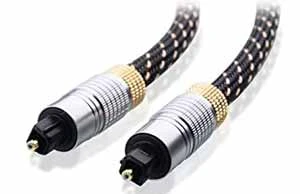
SPDIF typically uses coaxial cables fitted with RCA connectors — the same familiar style from older stereo equipment — rated at 75 ohms to help maintain signal integrity over longer runs. Some professional installations use a BNC connector instead, though the RCA variant dominates consumer setups by a wide margin. Toslink sends its signal through fiber optic strands using a distinctive square-tipped optical connector that slides into a matching port on your TV, receiver, or gaming console.
| SPDIF | Toslink |
| Typically transmits audio via RCA cables. | Usually transfers audio through the ADAT protocol. |
| Functions on stereo only. | Can function on 8 channels with 44.1/48Khz. |
| They are more durable and won't easily damage. | They are fragile but more flexible. |
| Better for connecting Multimedia players to audio receivers. | Ideal for use on Dolby Digital decoders. |
| Has a larger overall length. | Comparatively short in length. |
The electrical-versus-optical distinction carries more practical weight than it might first appear when you are choosing between the two. An electrical SPDIF signal running through copper wire can potentially pick up interference from nearby power cables or other electronics in your rack. A Toslink optical signal is immune to electromagnetic interference entirely, because light does not respond to electrical fields the way copper wire does. That immunity comes with a tradeoff, though — fiber optic cables are sensitive to sharp bends and connector damage in ways that coaxial cables are not.
Choosing between these two digital audio formats also means taking stock of which outputs and inputs your specific devices actually provide, since not every receiver or source component includes both types.
For a coaxial SPDIF connection, you need a digital coaxial output on your source device and a matching digital coaxial input on your receiver or amplifier. Standard 75-ohm RCA cables work well for most consumer setups, and if you are setting up a home theater on a budget, quality coaxial cables are widely available at modest prices. SPDIF coaxial cables tend to be the more affordable option when compared against dedicated Toslink optical cables of similar length and quality.
Toslink requires an optical output on your source and a matching optical input on your receiver, along with a dedicated fiber optic cable designed specifically for light transmission rather than electrical current. Many modern televisions, game consoles, and set-top boxes include a Toslink port alongside other outputs — if you have ever tried to connect a Bluetooth headset to a PS3, you have likely already noticed the optical audio port on the back. The cables cost slightly more than basic RCA alternatives but remain very affordable for typical home cable runs.
Pro tip: Always verify that your receiver's optical input supports the specific audio format your source outputs — not every Toslink port handles Dolby Digital or DTS passthrough by default, and a mismatch results in silence or downmixed stereo.
Neither standard is universally better than the other, and the right answer depends on your specific hardware, your room layout, and how you prioritize noise rejection versus durability and cable flexibility.
Coaxial SPDIF connections handle longer cable runs more reliably, making them practical when your source and receiver are physically far apart in a larger room or equipment rack. The cables are also more mechanically robust — you can bend them through tight spaces without worrying about cracking internal fibers. For connecting multimedia players and disc players to audio receivers, coaxial SPDIF is widely regarded as a durable and consistent performer that holds up well through years of daily use.
Toslink's fiber optic design eliminates electromagnetic interference entirely, which makes it the preferred connection when your cables run near power supplies, amplifiers, or other noise-generating components. It also provides galvanic isolation — meaning no electrical current flows between connected devices — which can eliminate ground loop hum that occasionally affects coaxial connections in certain equipment combinations. If you are working with a Dolby Digital decoder or a surround sound processor that benefits from a clean signal path, Toslink is a genuinely strong choice worth considering.
Warning: Toslink fiber cables can crack internally when bent too sharply or routed through tight corners — always keep cable bends gradual and never force the optical connector into its port at an angle.
Once you have settled on the right connection type for your hardware, a few deliberate choices about cable selection and device configuration help you extract the best possible audio from your setup.
Your first practical step is checking which digital audio outputs your source device actually provides, since many modern TVs offer only an optical Toslink output and skip the coaxial option entirely. If you are also troubleshooting display issues — like working through a pink screen problem on your laptop or computer — it pays to audit all your cable connections at the same time so you can rule out audio problems in one pass. Pairing each device's available output to the correct input on your receiver keeps your signal path clean and reduces potential failure points in the chain.
For SPDIF coaxial, a well-shielded 75-ohm cable under 10 meters handles most home theater installations without measurable quality loss or signal dropouts. For Toslink, practical performance begins to degrade past roughly 8 to 10 meters, and cheaper cables with poorly finished connectors can cause issues at shorter distances too. If your setup involves routing audio through a more complex digital chain, our guide on how to record and back up a Pocket Operator shows how careful attention to digital audio routing applies even in compact, specialized applications.
You do not always need new hardware to hear a meaningful improvement — a few targeted adjustments to settings and physical connections often resolve the most common audio issues without any additional cost.
Many source devices default to analog audio output even when a digital connection is physically present, so you need to navigate into the audio settings and manually enable PCM, Dolby Digital, or DTS output through the digital port. This is especially relevant if you are also exploring your device's other capabilities — our guides on adding apps to a Vizio Smart TV and installing third-party apps on an LG Smart TV walk through the same settings menus where audio output configuration typically lives. A single settings change often resolves what looks like a hardware problem entirely.
A loose connector causes more audio dropouts than defective cables or faulty equipment, yet it is easy to overlook when everything looks fine from the outside. For Toslink, pull the connector out, blow gently to clear any dust from the port, then reseat it firmly and evenly until it sits flush against the housing. For SPDIF coaxial, a gentle inward twist ensures solid metal-to-metal contact inside the RCA connector and eliminates the micro-gaps that cause intermittent signal loss.
Quick win: If you hear intermittent pops or sudden audio dropouts, swap the cable before assuming your receiver or source device is defective — a failing cable is the single most common cause of that specific symptom.
Even experienced users make predictable errors when working with digital audio connections, and knowing these pitfalls ahead of time spares you unnecessary troubleshooting and unplanned equipment purchases.
SPDIF-to-Toslink converters do exist, but adding a conversion step introduces potential latency, compatibility issues, and an extra component that can fail in a setup you intended to keep simple. If your receiver and source both offer each connection type, pick one format and use it consistently throughout the signal chain rather than mixing adapters into the path. Digital audio routing questions come up in other areas too — our guide on how to choose a gaming monitor for PC or console covers audio output options that often intersect with these same connection decisions.
Both formats have firm practical distance limits that are easy to exceed when routing cables through walls, under floors, or around room perimeters. Keep coaxial SPDIF runs under 10 meters and Toslink runs under 8 meters to stay within reliable operating range for consumer-grade cables. If your installation genuinely requires a longer run, a digital audio extender is a cleaner solution than pushing either format past its design parameters.

SPDIF stands for Sony/Philips Digital Interface Format, a digital audio standard jointly developed by Sony and Philips to provide a reliable method of transferring digital audio between consumer electronics components without the quality loss common in analog connections.
Yes, Toslink is an optical audio connection. The name comes from Toshiba Link, and it transmits digital audio as pulses of light through a fiber optic cable rather than as electrical signals through copper wire, which makes it immune to electromagnetic interference.
It depends on your specific setup. Coaxial SPDIF handles longer runs and is more mechanically durable, while Toslink provides complete electrical isolation and is immune to interference. Check which outputs your devices actually offer and match your cable choice to those ports.
You can, but a purpose-built 75-ohm shielded coaxial digital cable will perform more reliably than a standard audio RCA cable, particularly over longer runs where impedance mismatches can introduce signal errors or intermittent dropouts that are difficult to diagnose.
Yes, Toslink supports Dolby Digital and DTS surround sound when both your source device and receiver are configured to pass those formats through the optical connection. You typically need to enable bitstream or Dolby Digital output in your source device's audio settings menu.
Most manufacturers and audio professionals recommend keeping Toslink optical runs to 8 meters or less for reliable consumer-grade performance. Higher-quality cables can sometimes extend that range slightly, but 10 meters is generally considered the practical upper limit before signal degradation becomes a concern.
Yes, coaxial-to-optical converter boxes are widely available and generally affordable. They add a small conversion step to your signal chain but work reliably for most home audio applications and are a practical solution when your source and receiver do not share a common connection type.
Whether you end up with a coaxial SPDIF cable or a Toslink optical connection, both options deliver meaningfully cleaner audio than analog alternatives and give your home theater or listening setup a genuine quality upgrade worth making. Your best next step is to check the back of your receiver and source device right now, note which digital audio outputs are present, and match them to the right cable type using the guidance above. Browse the tech and electronics section for more in-depth guides on everything from gaming monitors to smart home devices, so you can keep building your setup with confidence.


About Mike Constanza
For years, Mike had always told everyone "no other sport like baseball." True to his word, he keeps diligently collecting baseball-related stuff: cards, hats, jerseys, photos, signatures, hangers, shorts (you name it); especially anything related to the legendary player Jim Bouton.Mike honorably received Bachelor of Science degree in Business Administration from University of Phoenix. In his graduation speech, he went on and on about baseball... until his best friend, James, signaled him to shut it.He then worked for a domain registrar in Phoenix, AZ; speciallizng in auction services. One day at work, he saw the site JimBouton.com pop on the for-sale list. Mike held his breath until decided to blow all of his savings for it.Here we are; the site is where Mike expresses passion to the world. And certainly, he would try diversing it to various areas rather than just baseball.
You can get FREE Gifts. Or latest Free phones here.
Disable Ad block to reveal all the info. Once done, hit a button below
 im
im